Dependencies
Open-source packages, advisories, and fixes.
Interopt reads your lockfiles and matches the packages they resolve to known advisories.
What you see
- Direct and transitive packages.
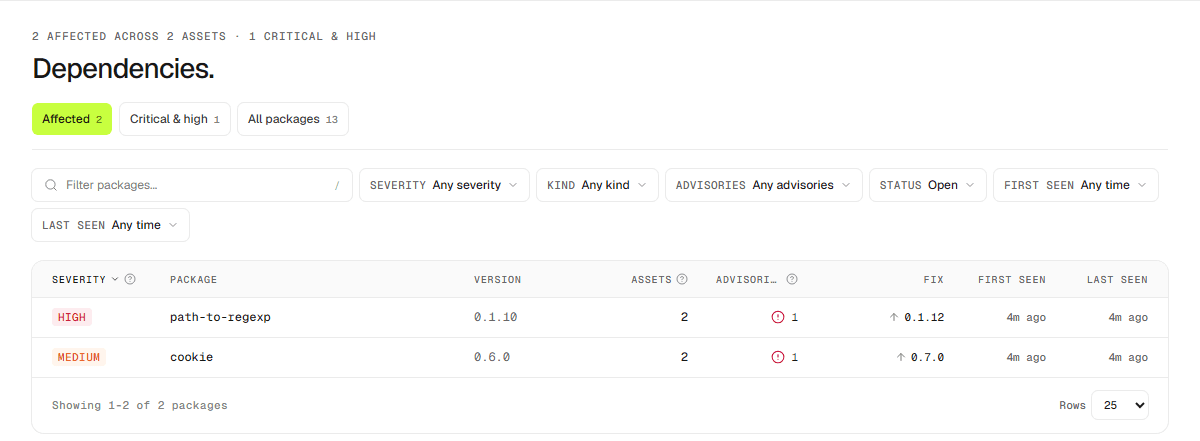
- The worst severity for each package and whether it is open, fixed, or ignored.
- The version that fixes it, and how many assets are affected.
Views
Dashboard → Dependencies is the workspace-wide list. Each asset also has a dependencies tab scoped to that target.
The Packages / Advisories toggle switches the workspace list between one row per package version and one row per advisory. An advisory row shows its CVE, the package version it affects, how many assets install that version, and the version that fixes that one advisory. Search matches CVE and GHSA ids, so you can check whether a specific CVE affects anything you run. Export downloads whichever list is showing, as XLSX or CSV.
Declared versions are shown separately from resolved ones, and only resolved versions are treated as proven.
Upgrading
Open a vulnerable package and choose Preview upgrade. The preview reads the repository and shows the manifest edits for the fixed version, along with any package that has to move with it; coupled packages cannot be upgraded on their own.
Download patch gives you a unified diff of those manifest changes. The lockfile is not part of the patch, so regenerate it after applying.
Reachability
What it looks like
The Dependencies list gives every package a row, with the worst severity against it and the version that fixes it.